


@Font-face - There Is More To Fonts Than Font-Family!
 7/17/2013 03:00:00 AM
 Jsc Jwhat Jerome Christopher
, Posted in
Browsers
,
Chrome
,
Download This
,
Font Tools
,
Linux
,
Online wordart creator
,
Puppy Linux
,
Sqlhtm Tools
,
Unix
,
Windows XP
Jsc Jwhat Jerome Christopher
, Posted in
Browsers
,
Chrome
,
Download This
,
Font Tools
,
Linux
,
Online wordart creator
,
Puppy Linux
,
Sqlhtm Tools
,
Unix
,
Windows XP

 |
| @FONT-FACE CSS AT-RULE. |
gen-fonts.sh VIEW SAMPLE DOWNLOAD SCRIPT
GET THE SAME LOOK EVERYWHERE WITH @FONT-FACE. GUARANTEED!
Even if someone had the worst website in the world, people might still flock to that site if only it had a great-looking font scheme. However simple or sparse that website, if it had a clean font scheme and used plenty of white space in a smart way, it could still make a lot of people visit often. The white color has the amazing quality of bringing out the real character of any and every font especially at higher sizes. In the old days it was so easy to just get by with some basic fonts and the header and paragraph tags. Not so anymore. The web has grown as if on steroids over the past decade and things are not simple anymore. While configuring a good font for your website with the @font-face css rule may look complex and cumbersome, it doesn't have to be so. Definitely not if you choose to use the simple scheme described in this article. I have been using Puppy Lucid Linux5.1 for over a year now and I have come up with a shell script which discovers and displays all installed fonts on a Linux system by dynamically generating code for the @font-face rules in the style block in the header and also the code for the body text in a webpage you can view with your browser. It may even show you the simplest way to use @font-face rules in your own webpages to make sure anyone and everyone in the whole wide world would see the same font display!
 |
| Sample wordart with Font3dTemplates |
NOW YOU SEE, NOW YOU DON'T
Don't you hate it when the text and image editors on your Linux system can display all installed fonts correctly but your web pages can't? It happened a lot to me on my Puppy Lucid Linux5.1 and that's the reason for this article. Even after I installed the fonts correctly and used body text with font-family in the tags, it still wouldn't show all fonts! If you guessed not using @font-face in the stylesheet with font-family and physical file location as the reason, you are web smart! And once I did it, it was like going digging and finding gold. All fonts sprang to life so spectacularly I couldn't believe my eyes!
Don't you hate it when the text and image editors on your Linux system can display all installed fonts correctly but your web pages can't? It happened a lot to me on my Puppy Lucid Linux5.1 and that's the reason for this article. Even after I installed the fonts correctly and used body text with font-family in the tags, it still wouldn't show all fonts! If you guessed not using @font-face in the stylesheet with font-family and physical file location as the reason, you are web smart! And once I did it, it was like going digging and finding gold. All fonts sprang to life so spectacularly I couldn't believe my eyes!
FONT LOCATIONS AND INSTALLATION ON A LINUX SYSTEM
PUPPY LUCID5.1 LINUX
Step 1: Copy the ttf or other font files to /root/.fonts directory. You may also copy the true type fonts to the /usr/share/fonts/default/TTF directory.
Step 2: Run the fc-cache command to cache the fonts.
fc-cache -fv
Step 3: Restart your browser for changes to take effect.
OTHER LINUX FLAVORS [MAY VARY]
Step 1: Download and copy the true type font files to /usr/share/fonts/default/TTF directory.
Step 2: Restart your browser for changes to take effect.
NOTE 1. Soft Links
You may also keep the font files at any directory and create soft links to font locations like this:
ln -s /your-font-directory/your-font.ttf /root/.fonts
or
ln -s /your-font-directory/your-font.ttf /usr/share/fonts/default/TTF
NOTE 2. Puppy Linux Font Locations
I'm not sure, but the following information probably comes from the Puppy Linux documentation or the helpful puppy forums.
The script script runs fast. The webpage fontlist may be fast or slow THE FIRST TIME depending on the number of fonts in the font directory.
I'm not sure, but the following information probably comes from the Puppy Linux documentation or the helpful puppy forums.
fc-cache -fv command caches fonts from these directories and cleans some of them at the end.
/root/.fontsNOTE 3. Script And Fontlist Webpage Speed
/usr/share/fonts
/usr/share/fonts/default
/usr/share/fonts/default/TTF
/usr/share/fonts/default/Type1
/usr/share/fonts/truetype
/usr/share/fonts/truetype/ttf-liberation
/usr/share/X11/fonts
/usr/share/X11/fonts/TTF
/usr/share/X11/fonts/Type1
/usr/share/X11/fonts/misc
The script script runs fast. The webpage fontlist may be fast or slow THE FIRST TIME depending on the number of fonts in the font directory.
NOTE 4. Treasure-hunt Your Font Directories
Try running the script on all the directories returned by running the command
fc-cache -fv. Trace soft links to their source files if needed.
NOTE 5. As Few Fonts As Possible
Use only the minimum-required number of fonts at your website as it may become unbearably resource-hungry.
SHELL SCRIPT TO GENERATE AND VIEW ALL INSTALLED FONTS ON YOUR LINUX SYSTEM [gen-fonts.sh]
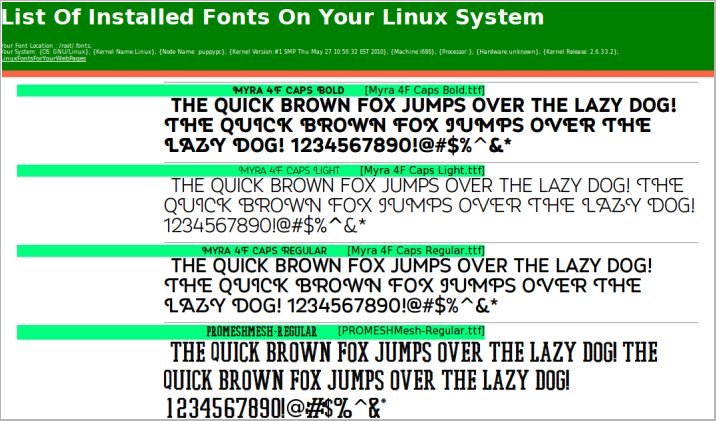 |
| Font list display produced by gen-fonts.sh |
Okay, so we now know how to install fonts on Puppy and other Linux systems. Let us go ahead and see how to use the @font-face rule in your embedded style sheet. First we will get the font location and loop to read one font at a time to generate the @font-face code in the head section and then we will loop one more time to create the code, this time for the anchor or paragraph tags inside the body of the web page.
The script below combines both steps to dynamically produce the list of all installed fonts on your Linux system in a web page.
INSTALLATION OF THE SCRIPT
GUI
1.DOWNLOAD SCRIPT and extract the file gen-fonts.sh at /tmp.
2.Change the first 2 lines of the script for font directory and the browser string
3.With a file manager like ROX-filer, right-click on the gen-fonts.sh file, and check the 3 boxes at the end to make all 3 executable
4.Click on the script to generate and view the list of installed fonts in your system.
COMMAND LINE
1.DOWNLOAD SCRIPT and extract the file gen-fonts.sh at /tmp.
2.Change the first 2 lines of the script for font directory and the browser string
3.Open up a terminal and type cd /tmp; chmod 755 gen-fonts.sh
4.Type ./gen-fonts.sh to run and view the installed fonts in a html file
ADAPTING THE SCRIPT FOR USE IN WEBSITES ONLINE
- First, copy your font files to a directory on your server, such as public-html/fonts or www/fonts, both of which point to the same location.
- Second, taking the code below as a sample , create @font-face rules for every font in the style block of the header. Eg.
<head><style>
@font-face {font-family:'Bigfish'; src:url('fonts/Bigfish.ttf'); }
@font-face {font-family:'Bigfish'; src:url('fonts/Bigfish.ttf'); }
</style></head>
- To end, put your text within tags such as "a" or "p" in the body. Eg.
<a class="btxt" href="">List Of Installed Fonts On Your Linux System</a>
Simple sample page using @font-face for your website page
<html>
<head>
<style>
@font-face {font-family:'Bigfish'; src:url('fonts/Bigfish.ttf'); }
.btxt {font-family:'Bigfish'; font-size:15px; }
</style>
</head>
<body>
<a class="btxt">List Of Installed Fonts On Your Linux System</a>
</body>
</html>
When we use fonts this way on the server hosting our website, everyone will see the same font on their laptop or pc even if they don't have this font installed. The only requirement is that their browsers must support the @font-face rule.
Did you know?
Typing the following command helps create a sorted display of available fonts
fc-list|sort
 |
| Sample wordart-Font3d |
HAVE YOU DOWNLOADED MY THREE FREE FONT PROGRAMS YET????
I have created four free font tools, three of which are free downloads. These three come with install and uninstall scripts that can be used for viewing the installed fonts on your Windows laptop or pc and also to view your text in all installed fonts and generate 3d wordart. Take a minute to read about these at sqlhtm.com. The fourth is an online web application. Watch the slideshow and play with the 4th tool online at sqlhtm.com! These are sure to be great additions to your toolset for online and offline web or other projects.


1.MyFontYourFont
Reads all your installed fonts on Windows and generates and shows sample text in horizontal and vertical formats in various sizes.

2.MyFontYourFontHot
Reads your text and displays them with all installed fonts so you can select the best-looking one for your blog or website article.

3.Font3dRandom
This is one of my bigger font projects which lets you create 3d html oneliner wordart with a totally endless variety of font and color combinations.

4.Font3dTemplates
This one's my biggest effort on 3dfont wordart program till date. The first version which is an online basic version creates simple wordart with installed regular and other floral and decorative fonts on Windows XP. When the regular fonts we use in everyday life or magnified, colored and shaded, we see MAGIC! Even fonts with your portraits or those of the celebrities can be enlarged, colored and 3d-shaded! It's that simple. The newer version currently under development has the really cool image and text drag-n-drop, local storage html5 features among others compared to the older version.
SOME VALUABLE FONT-RELATED WEBSITES ON THE WEB
1.96 Amazing typography blogs and resources
2.Comic sans-the font everyone loves to hate
3.Best free fonts and more
4.The anatomy of type
5.Free fonts-machupichu
6.Free fonts-webanddesigners
7.Top10 programming fonts-hivelogic
8.Top10 programming fonts-sitepoint
9.25 Free comic fonts
10.Create logo using custom font with svg
11.How to turn your handwriting into a font. Download, print, fill-in a pdf font template and upload to create your own font
2.Comic sans-the font everyone loves to hate
3.Best free fonts and more
4.The anatomy of type
5.Free fonts-machupichu
6.Free fonts-webanddesigners
7.Top10 programming fonts-hivelogic
8.Top10 programming fonts-sitepoint
9.25 Free comic fonts
10.Create logo using custom font with svg
11.How to turn your handwriting into a font. Download, print, fill-in a pdf font template and upload to create your own font
After reading this article, optimist said, "Nice read". Pessimist said, "fc-list".


